
Spaghetti Box Pasta Choices for Restaurant Takeout
Published
A spaghetti box lets restaurants pack takeout pasta, from classic tomato-based dishes to creamy, seafood, and spicy options. The specific dishes depend on the menu and how each order is portioned.
Choosing pasta for takeout takes more than picking a sauce. Restaurants need dishes that are practical to serve and pack, with familiar flavours alongside options for customers who want more heat. Spicy pasta can feature chili-forward tomato sauces, seafood with a kick, or creamy sauces balanced with spice.
This article outlines pasta menu categories that work for takeout and spicy dish styles restaurants can consider. It also explains how sauce, toppings, portioning, and packaging shape the choice, helping operators plan a menu that is easier to prepare, pack, and serve.
Key Takeaways
- Plan takeout pasta around the restaurant’s menu, portion, sauce, and toppings so each order is practical to pack and serve.
- For delivery or catering, organize orders by dish and keep packing steps consistent to reduce mix-ups during busy service.
- Compare pasta styles by sauce and flavour, including spicy options that balance heat with the other ingredients.
- Match the container choice to the food being served and the way the order will be handled.
- Use the article’s menu and packaging considerations to build a takeout setup that fits your kitchen workflow.
Table of Contents
Can I order a spaghetti box for delivery or catering in the Philippines?
Yes. Restaurants can offer boxed spaghetti through their delivery or catering menus. The restaurant prepares and portions the pasta, packs each order, and arranges the handoff through its chosen service. Available dishes depend on the restaurant’s menu. For operators, the decision starts with matching the portion and sauce to a container suited to the order.
Delivery and catering have different packing needs. An individual delivery order may include one pasta portion and a separate side. A catered order might include several portions, different sauces, or labelled meals for a group. Plan for each format before service so staff can pack accurately and customers know what comes with each meal.
Plan the order before packing
Use a simple order workflow. Record the dish and portion, identify toppings or sides that need separate packing, then label the order and group it with the correct delivery or catering batch. For example, list tomato-based spaghetti with grated cheese separately from spicy seafood pasta.
These steps matter when several menu choices arrive together. A clear ticket distinguishes a regular sauce from a chili-forward version, while a separate label can identify a requested add-on. Keep the packing sequence consistent across shifts so staff can follow the same routine during lunch, evening service, or a scheduled company meal.
Choose packaging around the dish
Consider the sauce, toppings, portion, and journey to the customer. A loose sauce needs careful handling during packing and handoff. Crisp toppings may need to be packed separately to preserve their texture. If the meal includes a side, arrange the packaging so the components stay organized rather than piled together.
Before adding a dish to a delivery menu, prepare a sample order using the intended portion and packing method. Close the container, group it with the other order components, and move it as staff would during a normal handoff. This test can reveal spills, crowded portions, or toppings that need separate packing. Adjust the setup before adding the dish to regular service.
Coordinate catering details
For catering, agree on the menu, portion format, and handoff plan with the customer. A group order may include one pasta choice or several. Use the event order sheet to list each dish, quantity, and special instruction. Keep the final list with the preparation team so kitchen and packing staff work from the same information.
Organize completed meals by dish or recipient, depending on the event. For an office lunch, labels can distinguish classic spaghetti from a spicy option. For a family gathering, grouping meals by menu choice can simplify distribution. Decide how meals will be handed out before staff pack the order.
Delivery timing also affects the kitchen sequence. Prepare dishes in the order that supports the planned handoff, and avoid leaving finished meals in the packing area while other components are still being assembled. For scheduled catering, agree on a pickup or delivery window with the customer as part of the order arrangement. The kitchen can then coordinate cooking, packing, and staging.
A boxed pasta menu works best when the dish, container, label, and handoff process align. Restaurants can offer spaghetti for delivery or catering by defining those details in advance, then training staff to follow the same packing steps for each order. Clear menu descriptions and organized tickets help customers choose, and help the kitchen send the right meal to the right recipient.
Sbox spaghettibox
“Sbox spaghettibox” reads like shorthand for a takeaway pasta container, not a dish name. For restaurants, the practical question is what the box needs to hold: the pasta portion, sauce, toppings, and any side. A menu listing such as classic tomato spaghetti or spicy seafood pasta gives staff clearer packing instructions than internal shorthand.
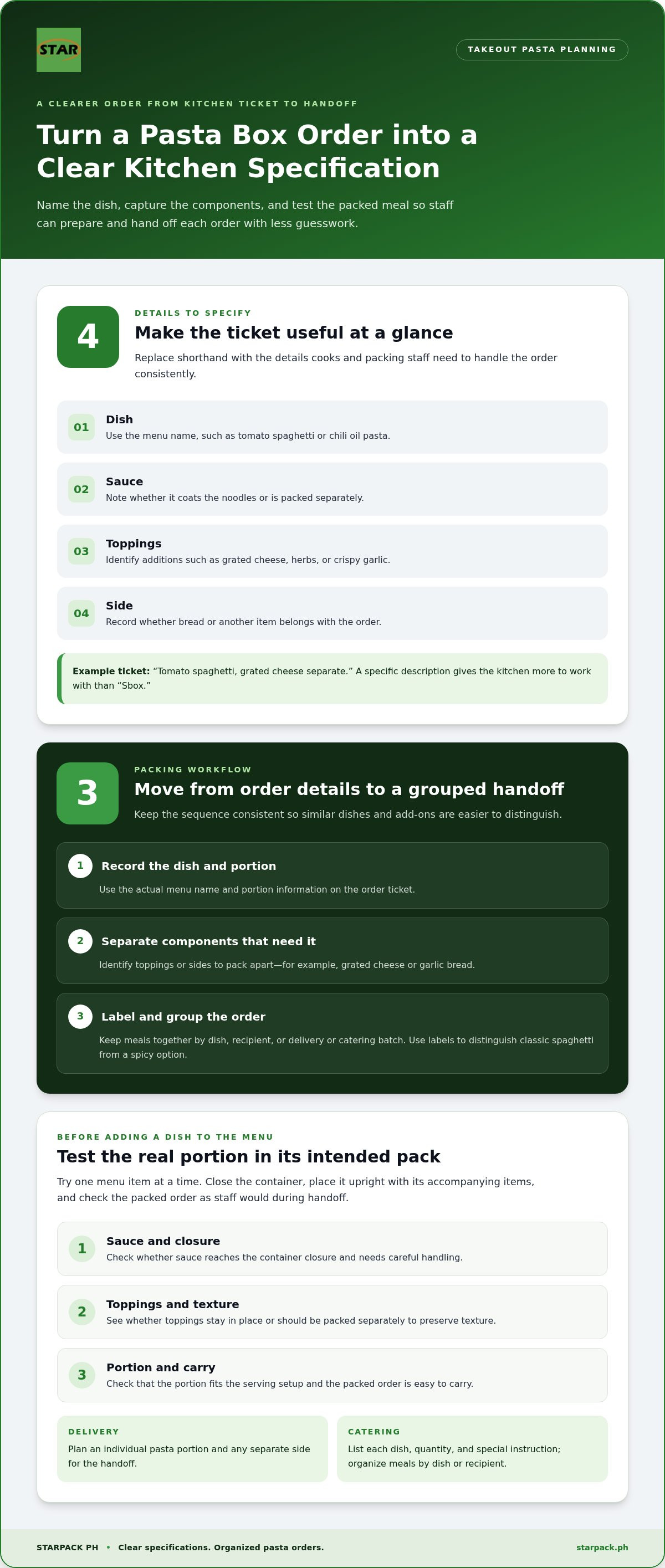
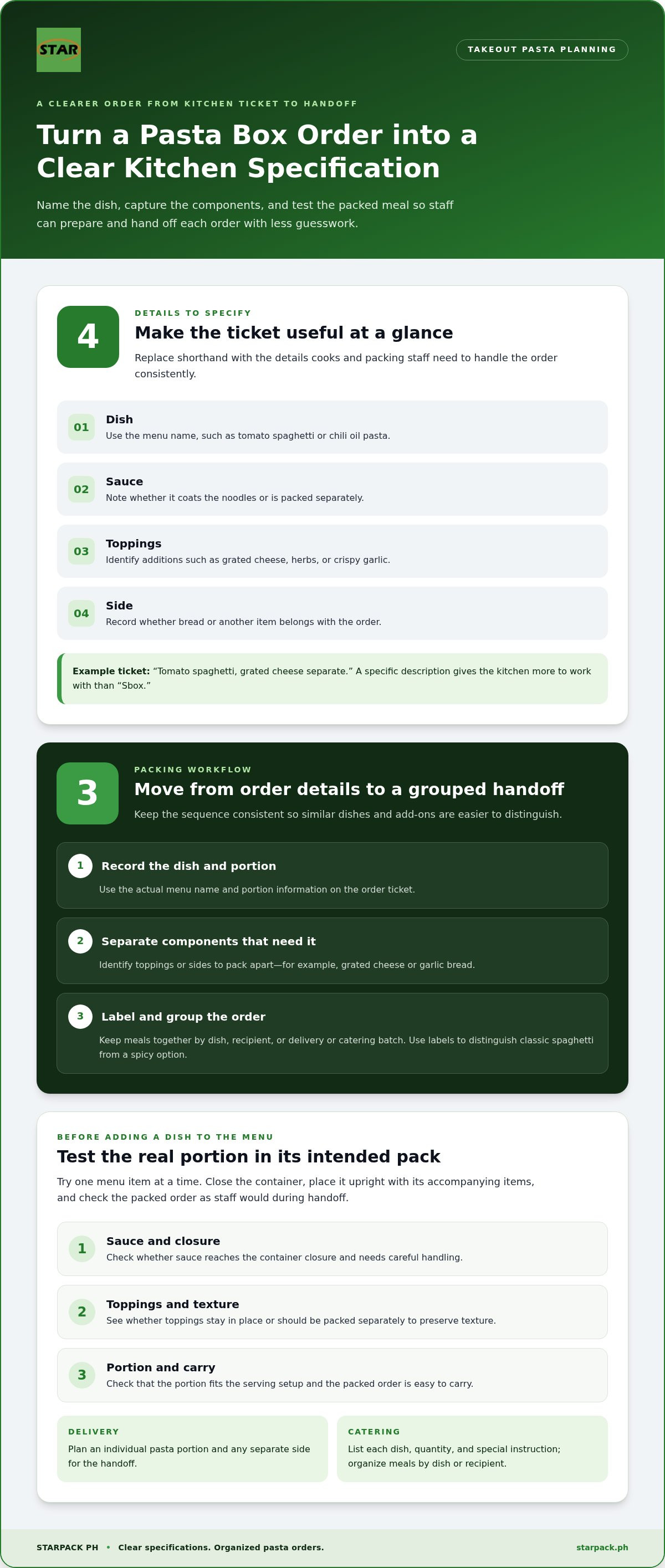
Translate the phrase into a practical order description. Put the dish name, sauce, portion, and add-ons on the kitchen ticket. For example, “tomato spaghetti, grated cheese separate” tells the kitchen more than “Sbox.” A clear ticket helps cooks and packing staff handle the order without guessing.
Turn shorthand into a usable specification
Use a short checklist before adding a pasta meal to a takeout menu. Identify the dish, how it will be served, and which components need separate packing. Clear specifications also help staff explain the dish and prepare it consistently across shifts.
- Dish: Name the menu item, such as tomato spaghetti or chili oil pasta.
- Sauce: Note whether it coats the noodles or arrives separately.
- Toppings: Identify additions such as grated cheese, herbs, or crispy garlic.
- Side: Record whether bread or another item belongs to the order.
These details matter when a menu has both mild and spicy choices. A customer ordering arrabbiata should receive the intended chili-forward dish, not a milder tomato version. Distinguish similar dishes on tickets and labels to reduce avoidable packing errors. Use the exact menu names on order slips and labels.
Match the container to the serving setup
Assess a container using the actual dish, not just its name. Tomato, cream, and oil-based sauces behave differently during packing. The container should suit the portion and keep the meal organized through handoff. Do not assume that a particular capacity automatically fits every pasta portion.
Test one menu item at a time. Add the usual serving, close the container, and place it upright with its accompanying items. Check whether sauce reaches the closure, toppings stay in place, and the packed order is easy to carry. Repeat with creamy pasta and spicy tomato pasta, since their sauces and toppings may differ.
If the meal includes a side, decide whether to pack it together with the pasta or separately. For example, packing garlic bread apart from sauced noodles can help preserve its texture. Separate packaging also keeps components distinct when pasta is served with a salad. Record the arrangement in the kitchen’s packing instructions.
Make the workflow consistent
Follow the same sequence for every order: read the ticket, prepare the listed dish, check the toppings, pack, and label. For a family order with classic spaghetti and chili pasta, keep each meal identified through handoff. A repeatable sequence gives new and experienced staff a shared process.
Review the setup whenever the menu changes. Seafood, extra cheese, or a separate dipping sauce can affect how an order should be packed. Update the dish description and packing note together, then test a complete order before service. This helps prevent a mismatch between the online menu and the prepared meal.
“Sbox spaghettibox” becomes useful only when the restaurant defines the food and packing steps behind it. Use recognizable dish names, specify sauce and toppings, and test each meal in its intended container. This turns ambiguous shorthand into workable kitchen instructions and helps customers receive the pasta they selected.
Spaghettibox bepnhasbox
“Spaghettibox bepnhasbox” may appear as a search phrase, but restaurant planning starts with the dish inside. A pasta container needs to suit the menu, serving method, and occasion. A family order of classic spaghetti has different packing needs from an individual serving of spicy seafood pasta.
Start with menu categories customers recognize. Classic tomato spaghetti, creamy mushroom pasta, seafood linguine, and chili-based noodles each bring different sauces and toppings. Describe each dish plainly so customers can choose by flavour and kitchen staff can distinguish meals during preparation and packing.
Match the dish to its components
Review each menu item as a complete meal, not just as noodles. Tomato pasta might include grated cheese, while a seafood dish could come with herbs and lemon. Decide which ingredients go on the pasta and which should stay separate. This affects presentation, packing order, and the customer’s first bite.
- Classic choices: Pair tomato sauce with familiar toppings such as cheese or herbs.
- Creamy choices: Describe the sauce clearly and identify additions such as mushrooms.
- Seafood choices: Name the seafood and list any separate garnish in the menu description.
- Spicy choices: State the chili-forward flavour and identify ingredients that contribute heat.
Clear menu distinctions also help staff avoid confusing similar-looking dishes. Spicy and classic tomato pasta, for example, may share noodles and colour. Clear dish names, order tickets, and labels keep the intended choice visible from preparation through handoff.
Describe heat without guesswork
Describe spicy pasta specifically, not with a vague label. Name the style, such as chili garlic noodles or arrabbiata, and mention the flavour ingredients. If customers can choose the heat level, explain that option on the menu. Do not rely on colour or an unexplained symbol alone.
For a balanced spicy dish, consider how the heat works with the sauce and toppings. Chili oil can complement garlic and vegetables, while spicy tomato sauce can pair with seafood or meat. Creamy sauce can soften chili’s sharpness. Test the full recipe as served, since a garnish added at the end can change the overall flavour.
Make each selection easy to identify. For example, print “chili garlic pasta” rather than “spicy pasta” on the order ticket. If the menu offers chili oil and chili flakes, list the selected option. This supports accurate preparation and helps packing staff label the finished dish correctly.
Test the complete takeout meal
Test a sample order for each menu category before service. Pack the usual portion with its sauce and toppings, then handle it as staff would during handoff. Check whether the meal stays organized and separate components remain distinct. Repeat the test when a recipe or serving arrangement changes.
Record the results in a simple packing guide. Include the menu name, topping placement, separate sides, and label wording. For instance, “seafood linguine, lemon garnish separate” gives staff a clearer instruction than a shorthand code. Keep the guide near the packing station for use during busy shifts.
Make the menu and packing notes work together. Clear descriptions help customers choose between familiar, creamy, seafood, and spicy pasta styles. A consistent packing guide then carries that choice through the kitchen. To plan the packaging side of your takeout setup, explore food packaging supplies.
Starpack PH: Spaghetti Box 500ml
Starpack PH supplies the Spaghetti Box 500ml for restaurants preparing pasta orders for takeout. It gives operators a named packaging option to consider when organizing their menu and packing workflow. Match the container to the portion and dish your kitchen serves, then use a consistent packing routine for each order.
For a wider takeout setup, Starpack PH also offers the Paper Cup 8oz, Kraft Salad Bowl 500ml, and Clamshell 700 Brown Silver. These options can support different menu components, such as drinks, salads, or other packed dishes. Select packaging according to the food being served and how each item fits into your order process.
For restaurant packaging supplies, visit Starpack PH.
Set Up Your Next Takeout Run
Turn menu choices into a repeatable packing routine. Decide how to pack each pasta portion, where add-ons go, and how staff will identify every order. A clear process helps the kitchen move from menu planning to service without leaving packaging decisions until the rush.
For restaurant takeout needs, Starpack PH offers the Spaghetti Box 500ml, Paper Cup 8oz, and Kraft Salad Bowl 500ml. Consider how each item fits the meals and drinks on your menu, then align your purchasing plan with the items your team regularly packs. A practical setup helps staff keep the right supplies close to the workstations that need them.
Ready to plan packaging for your next takeout menu? Contact Starpack PH about spaghetti boxes and take the next step toward a more organized packing workflow. Your team can keep service moving with a setup built around the meals you serve.
Frequently Asked Questions
What does “spaghetti box” mean in the Philippines?
In the Philippines, a spaghetti box usually means a takeout container for spaghetti or another pasta dish. It describes the packaging, not a particular recipe or sauce. Restaurants may use one for classic tomato spaghetti, creamy pasta, or a spicy choice. The right container depends on the portion and packing method. Treat the term as a general packaging description, then assess the actual container against the menu.
Where can I buy a spaghetti box in the Philippines?
Restaurants and food businesses can buy a spaghetti box from Starpack PH, which offers the Spaghetti Box 500ml. Estimate your kitchen’s usage, then plan the order around storage space and packing routines. For example, a restaurant with separate stations for pasta and sides can position its packaging near the relevant workflow. A spaghetti box order should align with the meals your team prepares regularly.
How much does a spaghetti box cost in the Philippines?
Costs vary by seller and order format. Compare quotes on the same basis, such as price per piece or per pack, and include any stated delivery charge. For a business purchase, consider how often staff use the packaging and how much storage the order requires. These factors help you assess the overall purchasing plan without relying on a price that may not match your order.
What sizes and servings do spaghetti boxes come in?
Sizes and serving fit vary by product. Starpack PH offers a Spaghetti Box 500ml, but capacity alone doesn’t define the portion a restaurant should serve. Sauce, toppings, and serving style affect the space needed. Test the container with an actual menu serving, including its usual garnish. Then set a consistent portioning approach so staff can pack the same dish reliably across orders.
Frequently asked questions
What does “spaghetti box” mean in the Philippines?
In the Philippines, a spaghetti box usually means a takeout container for spaghetti or another pasta dish. It describes the packaging, not a particular recipe or sauce. Restaurants may use one for classic tomato spaghetti, creamy pasta, or a spicy choice. The right container depends on the portion and packing method. Treat the term as a general packaging description, then assess the actual container against the menu.
Where can I buy a spaghetti box in the Philippines?
Restaurants and food businesses can buy a spaghetti box from Starpack PH, which offers the Spaghetti Box 500ml. Estimate your kitchen’s usage, then plan the order around storage space and packing routines. For example, a restaurant with separate stations for pasta and sides can position its packaging near the relevant workflow. A spaghetti box order should align with the meals your team prepares regularly.
How much does a spaghetti box cost in the Philippines?
Costs vary by seller and order format. Compare quotes on the same basis, such as price per piece or per pack, and include any stated delivery charge. For a business purchase, consider how often staff use the packaging and how much storage the order requires. These factors help you assess the overall purchasing plan without relying on a price that may not match your order.
What sizes and servings do spaghetti boxes come in?
Sizes and serving fit vary by product. Starpack PH offers a Spaghetti Box 500ml, but capacity alone doesn’t define the portion a restaurant should serve. Sauce, toppings, and serving style affect the space needed. Test the container with an actual menu serving, including its usual garnish. Then set a consistent portioning approach so staff can pack the same dish reliably across orders.